




Card, Dial or Lever? A 12-Test Method for Kids Audio Players
A kids audio player usability test should examine the whole physical ritual, not only whether a story eventually plays. Cards, dials, levers, buttons, lights and prompts create expectations before a child hears any audio. The following twelve tests help buyers compare prototypes without assuming one recognition technology or control layout is always best.
Repeat this structured review whenever regional voice, prompt order or media artwork changes, because each revision can alter what the user expects before playback begins.
Test 1: Can a new user predict the first action?
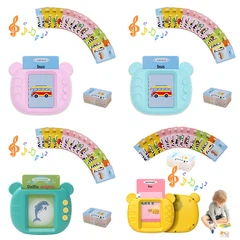
Place the player, its media and any accessories on a table without instructions. Observe what the user touches first. A card slot, circular deck, dial and lever each suggest different behavior. The test is not whether the user eventually succeeds; it is whether the product's physical layout makes the intended starting point obvious.
Record hesitation, wrong placements and requests for help. Those observations reveal conflicts between visible cues. If a card looks decorative or a dial resembles volume, better labels may not solve the underlying mismatch.
Test 2: Does media alignment tolerate ordinary handling?
Children rarely place a card with laboratory precision. Try centered, edge, tilted and quick placement using production-intent media. Repeat after changing coating, thickness or tag position. Recognition should be judged with the real enclosure because internal components and wall thickness can influence some technologies.
Log response time and failure type rather than counting only successful reads. A late response and an unknown-card error feel different to the user and may require different firmware feedback.

Start with the visible interaction
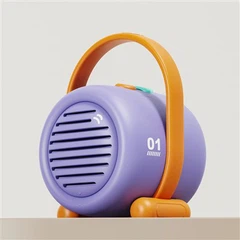
The front view reveals what a first-time user is likely to touch and what the product visually promises.
Test 3: Can play, pause and volume be distinguished by touch?
Cover labels and ask users to locate the main controls. Compare size, shape, force and position. A rotary control can communicate range, while separate buttons may be easier to learn but harder to find in low light if they feel identical.
The goal is not one universal layout. It is a consistent control language that matches the intended age and session. Accidental activation during carrying belongs in the same review.
Test 4: What happens when the wrong object is used?
Try an unsupported card, two stacked cards, a reversed card and an empty deck. A robust player should avoid confusing silence. The feedback can be a tone, light or spoken prompt, but it should not sound like successful playback.
Error behavior is part of the content experience. It must remain understandable at low battery and after updates, not only on the first polished sample.
Test 5: Is narration clear at real distance?
Use representative speech, songs and quiet passages. Listen beside the player, across a small bedroom and in a family room with background sound. Repeat while the cabinet rests on wood, fabric and a hollow table because surfaces can add vibration or change perceived bass.
Approval should reference the final speaker, grille, enclosure and firmware volume steps. A bare module is useful for selection, not for final audio claims.
Translate labels into behavior
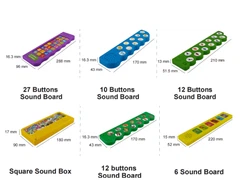
The control board supports a blind-label test for buttons, dial, speaker feedback and light states.

Test 6: Does the light support the task?
A flower light or status indicator can confirm recognition, signal charging or provide ambience. Observe it in daylight and darkness. Bright decorative light may overwhelm a bedtime setting; a subtle indicator may disappear in a bright shop or classroom.
Define every state and its duration. Color should not be the only cue when the product needs to communicate success, low power or error.
Test 7: Can the player recover from interruption?
Interrupt playback by removing media, pressing controls quickly, connecting power or letting the device sleep. Restart after low battery and incomplete updates if the architecture supports them. The user should understand whether the story resumes, restarts or waits for another action.
Recovery tests expose firmware edge cases that normal demonstrations avoid. They also help customer-support teams write useful troubleshooting steps.
Test 8: Does the square body remain stable?
Operate the top surface, front dial and any raised lever with one hand. Repeat on a soft bed and a smooth table. The cabinet should not slide or tip when the intended force is applied, and the flower-shaped upper element should not become a convenient handle unless designed for it.
Stability depends on feet, mass distribution, button force and internal layout. A heavier battery may improve one direction and worsen another.

Test sound in the real enclosure
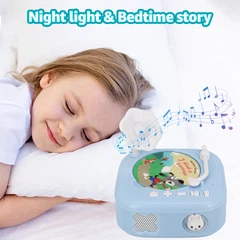
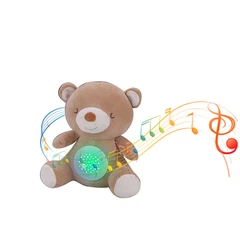
The bedroom scene is a reminder to measure narration at realistic distance and background noise.
Test 9: Are cards and accessories still organized after a week?
Give users enough media to create realistic clutter. Watch how they store, sort and select cards. Thin cards are compact but easy to misplace; thicker pieces may be easier to handle but increase packaging volume.
A library is a physical system as well as a content catalogue. Numbering, color families, wallets or boxes can reduce friction without adding electronics.
Test 10: Can an adult understand setup without becoming the interface?
Adults may handle charging, content loading or app setup, but children should not need adult navigation for every story. Time the first-use process, then remove the phone and test an ordinary session.
This separates one-time complexity from repeated complexity. A connected product can still feel screen-free when the phone stays backstage after configuration.
Test 11: Does packaging preserve function?
After transport simulation, inspect the raised light, top deck, controls, cards and cable. Then repeat recognition, audio, power and stability tests. Cosmetic survival alone is not enough if insert pressure changes control feel or card alignment.
The unpacking sequence should expose instructions before obscure accessories. A new user should know what is included and how the first story begins.
Sketch the sequence before freezing it
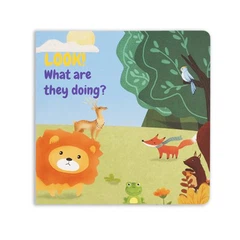
A concept sketch lets teams draw start, error and recovery paths before firmware and tooling are fixed.

Test 12: Can the result be compared across revisions?
Use the same media set, tracks, surfaces, lighting and observation form for each prototype. Record firmware, hardware, card and packaging versions. Without those references, "better" can become a memory rather than evidence.
A golden sample closes the loop. It preserves not just appearance but the timing, sound and feedback that made the interaction understandable.
Read patterns, not isolated mistakes
One failed card placement may be random. The same hesitation across several users points to alignment, feedback or media-shape trouble. Notes should preserve sequence: what the user expected, what they did, what the player did and how they recovered.
That sequence stops teams from fixing the visible symptom only. A louder error tone cannot solve a card that looks as if it belongs somewhere else.
Separate child tasks from adult tasks
Charging, account setup and library management may reasonably belong to adults. Starting a favorite story, changing volume and stopping playback may belong to the child. Marking ownership prevents a test from penalizing necessary adult setup or excusing repeated adult intervention.
The division should appear in the manual and packaging. If the child path requires an app every time, the product experience is not independent even if the player has no display.
Use comparable media during recognition tests
Different card thickness, coating or tag placement can change results. A fair prototype comparison uses the same controlled set and notes every construction change. Decorative samples that do not match production media may hide edge failures.
Keep accepted cards with the golden sample. They become a reference for incoming inspection and for troubleshooting after printer or material changes.

Keep variants comparable
OEM boards should link each color or media variant to the same interaction and inspection baseline.
Measure timing from the user's action
Recognition time should begin when the card reaches the intended position, not when a developer command is sent. Playback time includes any confirmation sound and buffering that the child experiences. Video from a fixed angle can make slow or inconsistent responses easier to compare.
A numerical target should come from the intended experience and architecture. The key early question is whether delay changes behavior-for example, repeated tapping that creates duplicate commands.
Check the meaning of every signal
List each light, tone and spoken prompt, then ask what the user is expected to do next. Two different faults should not use the same cheerful confirmation. Charging light should not be confused with media recognition in a dim room.
Signals work together. A quiet tone may be sufficient with a visible light, while an audio-only product needs prompts that remain clear without becoming disruptive.
Include accessibility and varied grip
Children and adults approach controls with different reach, strength and dexterity. Right- and left-handed use, seated angles and limited fine-motor precision can reveal layouts that work only in a designer's ideal pose.
Early observation can guide button spacing, symbol contrast and lever force. It does not replace formal accessibility or safety evaluation, but it prevents obvious barriers from reaching late tooling stages.
Test cleaning and ordinary surface wear
Cards collect fingerprints, top decks are rubbed repeatedly and front controls are touched with food or craft residue nearby. Use the intended cleaning instructions and inspect print, coating, icons and recognition afterward.
A finish that survives an abstract abrasion test may still become slippery or cloudy with the permitted cleaner. User instructions and material selection have to agree.
Use engineering views for repeatable checks
Front, side and top views support stability, port access and force-direction notes for the final test record.

Write the report for the next decision
A useful test report ends with what changed, what remains uncertain and which sample should answer it. Photos and videos are linked to hardware, firmware and media revisions. Observations are separated from conclusions so another reviewer can understand the evidence.
This format keeps a usability study from becoming a collection of opinions. It also gives sourcing, engineering and content teams a common list of priorities for the next prototype.
Run the tests in an order that protects evidence
Begin with observation before explaining the intended interaction. Then repeat with the instruction sheet to separate discoverability problems from documentation problems. Audio, light and recovery checks follow once the user can start playback, while stability, wear and packaging tests use the same identified sample.
This order prevents coaching from contaminating the first-action result. It also keeps a damaged transport sample from being mistaken for the original interaction baseline.
Define pass, concern and open question separately
Not every observation is a failure. A child may choose an unexpected method that still works safely and consistently. The report should mark whether the behavior violates a requirement, creates measurable friction or simply needs more evidence. That distinction helps teams spend prototype time on the most important uncertainty.
Pass criteria can include successful task completion, understandable feedback and safe recovery. Commercial performance claims require broader validation than an early usability review.
Repeat after any change that touches the ritual
A new cabinet finish, card printer, speaker, battery or firmware build can influence several tests at once. Teams should use a change-impact checklist rather than rerunning everything blindly or assuming cosmetic changes are harmless.
For example, a thicker top surface may alter recognition distance, and a stronger button spring may alter stability. Focused regression testing connects the changed component to the affected user actions.
Bring content reviewers into the physical test
Editors and localization reviewers often hear audio through studio headphones, while families hear it through the final speaker and enclosure. Including content reviewers in the device test exposes prompt pacing, pronunciation, loudness and card-title mismatches before a library is released.
The device and content should be approved as one experience. A technically successful read is still poor if the wrong story starts or the confirmation prompt interrupts the opening line. Repeat this review whenever regional voice, prompt order or media artwork changes, because each can alter what the user expects before playback begins.
Turn observations into the next prototype brief
The value of these tests is the pattern across them. If users miss the first action, fail card placement and misunderstand feedback, the product needs a clearer interaction-not three separate cosmetic fixes. If the interface works but audio or stability fails, the next revision can stay focused on engineering.
For background on this physical-media category, read the square children's phonograph family guide. Joy also shares short product-development demonstrations for sourcing teams.
FAQ
Q: How many users are needed for an early usability check?
A: A small varied group can reveal repeated misunderstandings; the goal is early diagnosis rather than a market claim.
Q: Should recognition be tested outside the final housing?
A: Bench tests help development, but approval should use the intended enclosure, media construction and internal layout.
Q: Why include error and recovery tests?
A: Real sessions include wrong media, low power and interruptions. Predictable recovery determines whether the interface remains understandable.
Q: What belongs in the golden-sample record?
A: Record housing, controls, firmware, audio, media, power behavior, feedback, accessories and packaging revision together.
Discuss a kids audio player test plan with Joy: WhatsApp +86 13691793052 · E-mail: xdt05@dtdianzi.com.